Citrix and NetScaler
Citrix and NetScaler
A Practical Introduction for IT Professionals
1. The Basic Idea
In a standard IT setup, applications are installed directly on the user’s laptop or desktop. That works fine for a small organization, but becomes difficult to manage at scale: every device needs software installation, updates, patching, and troubleshooting.
Citrix solves this by moving the application off the endpoint. With Citrix, the application runs on a server in the datacenter or cloud. The user’s device only receives the screen output and sends back keyboard and mouse input. The application itself is never installed locally.
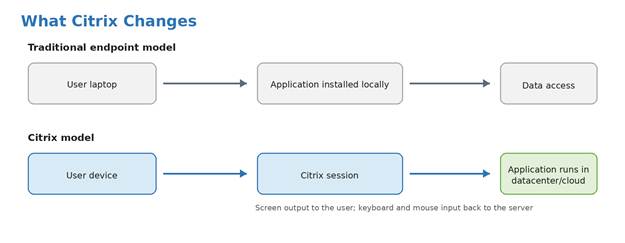
Figure 1: Citrix changes where the application runs. The endpoint becomes an access device, while the application stays in the datacenter or cloud.
NetScaler sits in front of this environment and controls how users reach it. For users inside the office, it load-balances traffic across Citrix servers. For users working remotely, it acts as the secure gateway — authenticating them, enforcing MFA, and proxying their session traffic into the internal environment.
In one sentence: Citrix runs the applications; NetScaler gets users to them securely.
2. What Citrix Delivers
Citrix Virtual Apps and Desktops is the main product family. It offers two delivery models:
| Model | What the user receives | Typical use case |
| Virtual Apps (formerly XenApp) | A single application window that looks and behaves like a local app | ERP client, finance app, legacy system, browser-based app |
| Virtual Desktops (formerly XenDesktop) | A complete Windows desktop session | Call center, contractors, regulated environments, thin-client deployments |
In both cases the user clicks an icon, the session opens, and they work normally. The difference is whether they get one application or an entire desktop.
Virtual Apps
A published application opens on the user’s device and looks like any other window. It can sit next to locally installed applications on the taskbar. The user typically has no idea it is running on a server in the datacenter.
Virtual Apps are the right choice when users need one or a few specific applications — particularly legacy applications that cannot be installed on modern endpoints, or applications where data must stay inside the datacenter.
Virtual Desktops
A published desktop gives the user a full Windows environment managed centrally. The organization controls exactly what is installed, what policies apply, and what the user can and cannot do. When the user logs off, the desktop can reset to a clean state, ready for the next user.
Virtual Desktops are the right choice when the organization needs to control the entire workspace — call centers, contractors, offshore teams, or any environment where standardization and security matter more than personalization.
Persistent vs Non-Persistent Desktops
| Type | Behaviour | Typical use |
| Persistent | The same desktop is assigned to the same user each time; changes are retained | Developers, power users, applications that require local installation |
| Non-persistent | Desktop resets to a clean image on logoff; user data is saved separately via profile tools | Call centers, task workers, shared workstations |
ⓘ Non-persistent desktops are easier to keep clean and patched, but they require solid profile management. Without it, users lose their settings every session.
What Citrix Does Not Change
Citrix changes how users access an application; it does not modernize or rewrite the application itself. A slow, unstable, or poorly designed application can still be slow or unstable inside Citrix. Citrix centralizes access and control, but application quality, backend performance, database performance, and network dependencies still matter.
3. Citrix Components
A Citrix environment has several moving parts. Understanding what each component does makes troubleshooting and architecture much easier.
| Component | What it does |
| Citrix Workspace app | The client software installed on the user’s device. Handles the session connection, display rendering, and local device integration (printing, audio, clipboard). |
| StoreFront | The internal web portal. After authentication, StoreFront shows each user the applications and desktops they are permitted to access. Usually published behind NetScaler for external users. |
| Delivery Controller | The broker. When a user clicks an application or desktop, the Delivery Controller selects a suitable server and hands the user’s client the connection details. |
| VDA (Virtual Delivery Agent) | Software installed on every server or virtual desktop that can host user sessions. The VDA registers with the Delivery Controllers to advertise its availability. |
| Machine Catalog | A group of servers or virtual desktops with the same configuration and purpose (e.g., all Windows Server 2022 app servers for SAP). |
| Delivery Group | Defines which users can access which machine catalog. A user’s Active Directory group membership determines what they see in StoreFront. |
| Citrix Director | The monitoring and helpdesk console. Used to view active sessions, shadow users, identify performance issues, and troubleshoot logon problems. |
| Profile Management / FSLogix | Handles user profile roaming across sessions. Critical in non-persistent environments where the desktop resets on logoff. |
| License Server | Manages Citrix licenses. If the license server is unreachable, Citrix enters a grace period before sessions start failing. |
What Runs Where
The following table helps place each component in the environment. This is useful because Citrix issues often involve several systems, not just one server.
| Component | Where it usually runs | Why it matters |
| Citrix Workspace app | User endpoint | Starts the session and renders the remote application or desktop. |
| NetScaler Gateway | DMZ or edge network | Secure external entry point for remote users. |
| StoreFront | Internal server network | Portal that shows users their assigned apps and desktops. |
| Delivery Controller | Internal server network | Brokers sessions and selects an available VDA. |
| VDA | Server or desktop hosting sessions | Runs the user session, application, or desktop. |
| SQL Server | Internal database platform | Stores Citrix site configuration and operational data. |
| License Server | Internal server network | Provides license availability for Citrix sessions. |
| Profile storage / FSLogix | File server or storage platform | Stores user profiles and settings across sessions. |
The VDA in More Detail
The VDA is one of the most important concepts in Citrix. It is installed on every machine that will host user sessions — whether that is a Windows Server running published apps, a Windows 10/11 VM providing virtual desktops, or even a Linux VM for Linux application delivery.
On startup, the VDA registers with the Delivery Controllers and effectively says: I am online, I have capacity, I can accept sessions. When a user launches an app or desktop, the Delivery Controller picks an available VDA and directs the user’s client to connect to it. The session then runs on that VDA until the user disconnects or logs off.
What HDX and ICA Mean
You will hear these two terms constantly in Citrix environments:
| Term | What it means |
| ICA (Independent Computing Architecture) | The underlying session protocol Citrix uses to carry traffic between the user’s client and the VDA. Carries screen updates, keyboard/mouse input, audio, printing, clipboard, and file redirection. |
| HDX (High Definition Experience) | Citrix’s set of technologies built on top of ICA to optimize the session for different network conditions, content types, and endpoint capabilities. HDX includes adaptive compression, browser content redirection, audio/video optimization, and more. |
In practice: when someone says “the ICA session is dropping” or “HDX is performing poorly”, they are talking about the connection between the user’s device and the server hosting their session.
4. NetScaler
NetScaler (also known as Citrix ADC — Application Delivery Controller) is a network appliance or virtual appliance that sits in front of applications and controls how users reach them. In Citrix environments it plays two main roles: load balancer and remote access gateway.
NetScaler as a Load Balancer
Rather than users connecting directly to a single server, they connect to a virtual IP address (VIP) on NetScaler. NetScaler distributes those connections across a pool of backend servers, monitors their health, and stops sending traffic to any server that fails a health check.
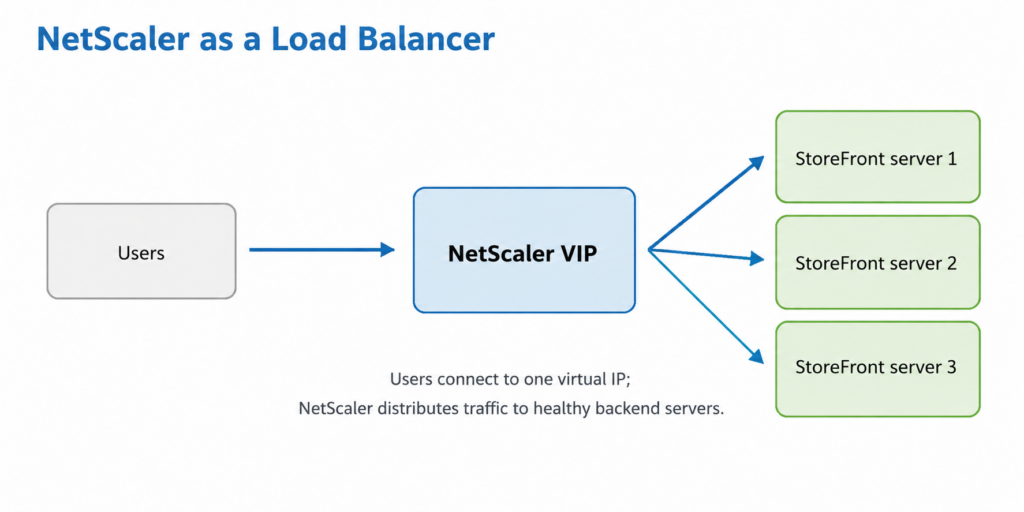
In a Citrix environment, NetScaler typically load-balances StoreFront servers, Delivery Controllers, and any other services that need to scale across multiple instances.
NetScaler as a Citrix Gateway
For remote users, NetScaler Gateway is the secure entry point. A remote user connects to a public URL — for example, https://citrix.company.com — which resolves to NetScaler’s public IP. NetScaler then:
- Presents the login page and authenticates the user against Active Directory.
- Enforces MFA if configured.
- Communicates with StoreFront to retrieve the user’s assigned apps and desktops.
- Proxies the HDX/ICA session traffic between the user’s client and the internal VDA.
The internal Citrix infrastructure is never directly exposed to the internet. NetScaler is the only internet-facing component, placed in the DMZ. All session traffic passes through it.
The STA — Secure Ticket Authority
When a remote user launches an app or desktop through NetScaler Gateway, the Delivery Controller issues a ticket — a short-lived token — via the Secure Ticket Authority (STA). The user’s Workspace app presents this ticket to NetScaler Gateway, which validates it and allows the HDX session to proceed. The STA is what lets NetScaler proxy the session without exposing the internal VDA’s IP address to the external client.
ⓘ STA issues are a common cause of external-only launch failures. If internal users can launch apps but external users cannot, checking STA connectivity between NetScaler and the Delivery Controllers is usually an early step.
Key NetScaler Concepts
| Term | What it means |
| NSIP | The management IP of the NetScaler appliance. Used to access the admin interface. |
| SNIP (Subnet IP) | The IP NetScaler uses to communicate with backend servers. Backend servers see connections arriving from the SNIP, not from the user’s IP. |
| VIP (Virtual IP) | The IP address users connect to. One VIP per virtual server (Gateway, load balancer, etc.). |
| vServer | A virtual listener on NetScaler. A Gateway vServer handles remote Citrix access; a Load Balancing vServer handles internal traffic distribution. |
| Service / Service Group | Represents a backend server or pool of servers. NetScaler sends traffic to these and monitors their health. |
| Monitor | A health check that NetScaler runs against backend services. If a monitor fails, the service is marked DOWN and taken out of rotation. |
| Session Policy | Controls what a Gateway session is allowed to do: which StoreFront address to use, timeout values, split tunnelling, and so on. |
| Authentication Policy | Defines how users authenticate: LDAP for AD password, RADIUS for MFA, SAML for identity provider integration. |
5. How It All Fits Together
A Remote User Launching an Application
Here is the complete flow when a remote user opens a published application:
1. User opens https://citrix.company.com
2. DNS resolves to NetScaler Gateway public IP
3. NetScaler presents the login page
4. User authenticates (AD password + MFA)
5. NetScaler contacts StoreFront
6. StoreFront returns the user’s assigned apps/desktops
7. User clicks an application icon
8. Delivery Controller selects an available VDA
9. Delivery Controller issues an STA ticket
10. User’s Workspace app presents the ticket to NetScaler
11. NetScaler validates the ticket with the STA
12. NetScaler proxies the HDX session to the VDA
13. Application launches; user is working
The user sees a single application window. Behind it, six or more systems have cooperated to deliver it.
Internal vs External Access
Internal users (on the corporate network) typically bypass NetScaler Gateway. They may go directly to StoreFront or use an internal load-balanced URL. In many environments that internal load-balanced URL is still hosted on NetScaler, but NetScaler is then acting as a load balancer, not as the external Gateway.
External users always go through NetScaler Gateway. This is the security boundary: NetScaler authenticates the user before any Citrix infrastructure is reachable.
Typical On-Premises Architecture
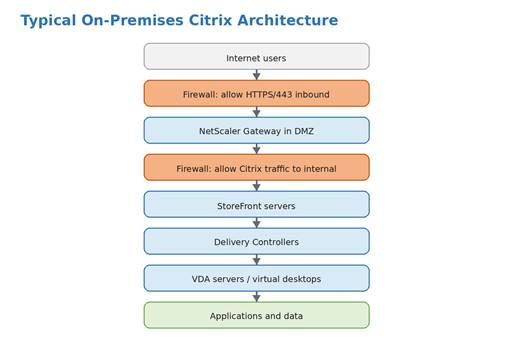
Typical Ports and Protocols
The exact ports depend on the design, but the following table is a useful high-level checklist for understanding the main communication paths.
| Flow | Typical protocol / port | Purpose |
| User to NetScaler Gateway | HTTPS / TCP 443 | External access to the Citrix Gateway URL. |
| NetScaler Gateway to StoreFront | HTTPS / TCP 443 | Gateway retrieves the user resource list from StoreFront. |
| NetScaler Gateway to STA / Delivery Controllers | HTTPS / TCP 443 or configured STA port | Ticket validation and launch brokering for external sessions. |
| Citrix session traffic through Gateway | HDX/ICA proxied over TLS | Remote application or desktop display traffic. |
| VDA to Delivery Controller | Citrix broker communication | VDA registration and session brokering. |
| VDA to profile storage | SMB / TCP 445 | Citrix profiles or FSLogix containers. |
| Citrix components to SQL Server | SQL Server / TCP 1433 or configured SQL port | Citrix site database connectivity. |
Supporting services that must also be available:
- Active Directory — for user authentication and group-based access control
- DNS — both internal resolution and public DNS for the Gateway URL
- SQL Server — the Delivery Controllers store site configuration and session data in SQL
- License Server — Citrix components check out licenses on connection
- File server / profile storage — for user profile data in non-persistent environments
- MFA / identity provider — integrated via RADIUS or SAML through NetScaler
6. Authentication and Access Control
Authentication Methods
| Method | How it works | Typical use |
| LDAP / Active Directory | NetScaler or StoreFront validates the username and password directly against AD | Standard internal and external login |
| RADIUS | NetScaler forwards credentials to a RADIUS server, which usually handles MFA | OTP tokens, push notifications, hardware tokens |
| SAML | Citrix delegates authentication to an external identity provider (Entra ID, Okta, ADFS) | SSO environments, modern MFA platforms, conditional access |
| Certificate / smart card | Client presents a certificate rather than a password | High-security environments, government, healthcare |
In modern deployments, SAML integration with Entra ID or Okta is increasingly common. This allows organizations to apply conditional access policies — blocking access from non-compliant devices, enforcing location-based rules, or requiring step-up authentication for sensitive applications — centrally through the identity provider rather than through NetScaler alone.
Access Control
Citrix access is group-based. Users do not see every published application — they see only what their Active Directory groups entitle them to. A typical setup:
| AD group | What the user sees in Citrix |
| Citrix_Finance_Users | Finance ERP application |
| Citrix_SAP_Users | SAP client |
| Citrix_CallCenter_Desktop | Standardized call center desktop |
| Citrix_Contractors | Restricted desktop with limited clipboard and no drive mapping |
| Citrix_Admins | Administration tools and management desktop |
7. Policies, Profiles, and Resource Redirection
Citrix Policies
Citrix policies control session behavior. They are applied by the Delivery Controller based on user, group, or connection type, and cover things like:
- Whether clipboard copy/paste is allowed between the session and the local device
- Whether local drives appear inside the Citrix session
- Whether USB devices can be redirected into the session
- Whether local printers are available in the session
- Session display quality and bandwidth limits
These settings matter for both security and usability. Clipboard redirection, drive mapping, and USB redirection are the most common vectors for data leakage in Citrix environments, and they are also the most common sources of support requests when disabled. Getting the policy balance right for each user group is one of the more important design decisions in a Citrix deployment.
User Profiles
A user expects their settings to follow them across sessions: desktop background, application preferences, Outlook profile, browser favorites, mapped drives. In a non-persistent Citrix environment, the VM resets on logoff, so without profile management every user starts from a blank slate every time they log in.
The two main profile technologies in use today are Citrix Profile Management and Microsoft FSLogix.
Citrix Profile Management
Citrix Profile Management is Citrix’s own solution, configured through Citrix policies. At logoff, it copies a defined set of folders and registry keys from the local profile to a file share. At next logon, it copies them back.
This approach works but has limitations. Copying profile data over the network takes time, so logons are only as fast as the network and file server allow. Large profiles — common when Outlook caches are stored locally — can make logons noticeably slow. Citrix Profile Management also requires careful configuration to define exactly which folders and keys should be saved, and which should be excluded. A misconfigured inclusion list either bloats the profile or fails to preserve settings users care about.
FSLogix
FSLogix, acquired by Microsoft in 2018 and now included with Microsoft 365 and most Windows Server licenses, takes a fundamentally different approach. Rather than copying files to and from a share, FSLogix stores the entire user profile inside a VHD or VHDX container file hosted on a file share. At logon, the container is attached as a virtual disk and mounted as the user’s local profile path. At logoff, it is detached.
From Windows’ perspective, the profile is local. There is no copy operation at logon or logoff — only a fast disk attach. This has three significant advantages over file-copy approaches:
- Logon times are much faster, particularly for users with large profiles, because no data is transferred at logon.
- Outlook and other applications that rely on local profile paths work correctly without special configuration, because the profile genuinely appears local to the OS.
- Profile consistency is better in environments where users can run concurrent sessions, because the container is a single file rather than a folder tree that multiple sessions might write to simultaneously.
In a typical Citrix deployment, FSLogix containers are stored on a high-availability file share — either a Windows file server with DFS, Azure Files, or a purpose-built solution like NetApp. The share must be accessible from every VDA that might host a session for that user. If the share is unavailable at logon, FSLogix falls back to a temporary local profile, which means the user’s settings are not saved for that session.
| Citrix Profile Management | FSLogix | |
| Mechanism | Copies selected files and registry keys to/from a file share | Attaches a VHD/VHDX container as the local profile disk |
| Logon speed | Depends on profile size and file server speed | Fast — disk attach rather than file copy |
| Outlook / large app compatibility | Requires configuration workarounds for OST files and large caches | Works natively — apps see a local disk |
| Concurrent sessions | Can cause conflicts if the same user runs multiple sessions | Container locking handles this; read-only mirrors available for concurrent use |
| Licensing | Included with Citrix | Included with Microsoft 365 and Windows Server RDS licenses |
| Typical use today | Legacy environments; simple use cases | Default choice for most new Citrix deployments |
ⓘ FSLogix has largely replaced Citrix Profile Management as the default choice for new deployments. If you are designing a new Citrix environment, start with FSLogix unless there is a specific reason not to.
Whichever technology is used, poor profile design remains one of the most common causes of slow logons and broken sessions. Profile size, file server performance, and what is included or excluded all need to be thought through before going to production.
8. Common Issues and Where to Look
Citrix problems can be hard to diagnose because many components are involved and a failure in any one of them can produce the same symptom. The table below maps common symptoms to their most likely causes.
| Symptom | Start investigating here |
| User cannot log in at all | AD account, password expiry, MFA configuration, NetScaler authentication policy, LDAP/SAML connectivity |
| Application does not launch | VDA registration (check Delivery Controller for VDA state), StoreFront brokering, STA ticket validation, Citrix license availability |
| External users fail, internal users work | NetScaler Gateway, STA connectivity between NetScaler and Delivery Controllers, firewall rules between DMZ and internal, TLS certificate validity |
| Session is slow or laggy | Network latency between client and VDA, VDA server CPU/memory load, storage latency on the VDA host, HDX policy settings |
| Logon is slow | Profile loading time, FSLogix container mount time, GPO processing, logon scripts, file server latency |
| Printing fails | Printer driver on VDA, Citrix printing policy, client printer redirection policy, Universal Print Driver availability |
| Clipboard not working | Citrix policy restricting clipboard redirection (check both user and machine policies) |
| Only one application fails | Application-specific issue: permissions, licensing, application server health, or misconfiguration of that Delivery Group |
Citrix Director is the first place to check for session-level problems. It shows active and recent sessions, logon duration breakdowns (authentication time, profile load time, GPO time, etc.), and allows helpdesk staff to shadow or disconnect sessions without needing RDP access to the VDA.
9. Security Considerations
Citrix and NetScaler are often the gateway to an organization’s most sensitive applications. Getting security right matters.
NetScaler
- NetScaler is internet-facing and has been the target of significant vulnerabilities in recent years. Keeping it patched is not optional.
- TLS certificates must be valid, renewed before expiry, and bound to the correct virtual servers. Expired certificates are a common cause of external access failures.
- Cipher suites should be configured to exclude weak algorithms. NetScaler ships with a default profile that can include older ciphers; review and tighten this for externally facing services.
- MFA should be enforced for all external access. Password-only authentication to a Citrix Gateway is not acceptable in most environments today.
Citrix Environment
- Apply least-privilege access control. Users should see only the applications their role requires.
- Restrict clipboard, drive mapping, and USB redirection by policy. Enable only what each user group genuinely needs.
- Harden VDA servers as you would any server running business applications. They are exposed to user sessions and can be a pivot point if compromised.
- Monitor and log session activity. Citrix Director and NetScaler both provide logging; integrate with a SIEM where possible.
- Control file transfer. Client drive mapping and clipboard redirection both allow data to leave the Citrix environment. For high-sensitivity applications, disable both.
10. When Citrix Makes Sense — and When It Does Not
| Citrix is a strong fit when… | Citrix may not be the right answer when… |
| Users need access from unmanaged or varied devices | The only requirement is a simple web application accessible via a browser |
| Applications must stay centralized for security or compliance | The organization has already modernized to SaaS and cloud-native apps |
| Legacy applications cannot run on modern endpoints | Graphics-intensive workloads are required without a proper GPU-enabled design |
| Thin clients or locked-down endpoints are used | Licensing and operational cost outweigh the benefit of centralization |
| Remote access is required for contractors or offshore teams | The internal team lacks the skills to design, operate, and troubleshoot a Citrix environment |
| Consistent, controlled desktops are needed for task workers | Endpoint software deployment is simpler and cheaper for the use case |
ⓘ Citrix is a sophisticated platform that rewards careful design and skilled operations. Poorly designed Citrix environments — particularly around profiles, policies, and sizing — deliver a worse user experience than local application installation. The technology is only as good as the implementation.
11. Citrix Cloud and Modern Deployments
Citrix now offers a cloud-managed variant where the control plane — Delivery Controllers, StoreFront, and license management — is hosted and managed by Citrix rather than deployed on-premises. The VDAs still run in the customer’s datacenter or cloud environment; only the management layer moves to Citrix Cloud.
This reduces operational overhead for the control plane components and simplifies upgrades, but it introduces a dependency on Citrix’s cloud services and requires connectivity from the VDAs to the internet-hosted control plane.
Citrix also offers a Gateway Service, which provides secure remote access without deploying NetScaler Gateway in the DMZ. Traffic is proxied through Citrix’s cloud infrastructure instead. This is attractive for smaller organizations or those without DMZ infrastructure, but organizations with complex authentication requirements, compliance boundaries, or advanced ADC needs often continue to run on-premises NetScaler.
On-premises deployments remain common in larger enterprises, regulated industries, and any environment where control over the entire stack — including the network path of session traffic — is a requirement.
Summary
Citrix Virtual Apps and Desktops centralizes application and desktop delivery. Applications run on servers in the datacenter; users receive only the remote display. This gives IT control over what software runs, where data lives, and who can access what — from almost any device, anywhere.
NetScaler provides the access layer. For users inside the network, it load-balances traffic across Citrix servers. For remote users, NetScaler Gateway is the secure, authenticated entry point that proxies session traffic without exposing internal infrastructure to the internet.
The environment has many components — Delivery Controllers, VDAs, StoreFront, the STA, profile management, and NetScaler — and problems in any of them can affect users. Understanding what each component does, and how they depend on each other, is the foundation for designing, operating, and troubleshooting Citrix environments effectively.
Control Questions
Question 1
End-to-end session delivery
Walk through the main stages from a remote user clicking a published application icon to the application running on their screen. You do not need every protocol detail, but explain which major component is responsible for each stage.
Question 2
Published application vs published desktop
A manager asks whether their team should use published applications or a published desktop. What questions would you ask before making a recommendation, and what would drive your answer?
Question 3
Persistent vs non-persistent desktops
What is the difference between a persistent and a non-persistent virtual desktop, and what operational problem does non-persistent introduce that persistent does not?
Question 4
StoreFront vs Delivery Controller
StoreFront and the Delivery Controller are both involved when a user launches an application. Why are they separate components? What would break if StoreFront went down but the Delivery Controllers were still running?
Question 5
NetScaler load balancing vs Citrix Gateway
NetScaler can act as a load balancer and as a Citrix Gateway. These are different roles. Explain what each role does and why the same NetScaler platform often performs both.
Question 6
Secure Ticket Authority
What is the STA ticket, why does it exist, and what symptom would you expect to see if the STA is not working correctly?
Question 7
DMZ placement
Why is NetScaler Gateway placed in the DMZ rather than putting StoreFront or the Delivery Controllers directly on the internet?
Question 8
Citrix and slow legacy applications
A business unit is complaining that their legacy ERP application is slow and difficult to maintain. Someone suggests putting it in Citrix. What can Citrix realistically solve here, and what can it not solve?
Question 9
FSLogix and profile containers
FSLogix stores the user profile in a VHD or VHDX container rather than copying files to and from a share. Why does this matter, and what practical problems does it solve compared with a file-copy approach?
Question 10
Non-persistent desktops and profile failures
A user on a non-persistent desktop reports that when they logged in this morning their Outlook was unconfigured, their browser favorites were gone, and their desktop looked like a first-time setup. What most likely happened, and how should the investigation start?
Question 11
Resource redirection and security
Clipboard redirection, drive mapping, USB redirection, and printer redirection are all disabled by default for a group of contractor users. A contractor complains they cannot copy text from a Citrix application into a local document. Is this a misconfiguration, or is it intentional? How would you handle this?
Question 12
Troubleshooting slow Citrix sessions
A user calls the helpdesk and says “Citrix is slow”. What follow-up questions would you ask, and why is the original complaint not useful for troubleshooting?
Question 13 – advanced/design
Machine Catalogs vs Delivery Groups
What is the difference between a Machine Catalog and a Delivery Group in Citrix, and why are they separate concepts rather than one single configuration object?
Question 14 – advanced/design
When Citrix is the wrong answer
A startup with 40 employees, all using modern SaaS applications, asks whether they should deploy Citrix. What is your recommendation and reasoning?
Model Answers
Qestion 1
This question tests whether the reader understands the full delivery chain, not just isolated components.
The user opens the Citrix URL in a browser or Workspace app. DNS resolves this to NetScaler Gateway’s public IP.
NetScaler Gateway presents the login page. The user authenticates, typically with an Active Directory password and MFA.
NetScaler contacts StoreFront. StoreFront checks what the user is entitled to access and returns the list of available applications and desktops.
The user clicks the application icon. StoreFront contacts the Delivery Controller and requests a session.
The Delivery Controller selects an available VDA with capacity to host the session. For external access, an STA ticket is issued via the Secure Ticket Authority.
The user’s Workspace app presents the STA ticket to NetScaler Gateway. NetScaler validates the ticket with the STA.
NetScaler proxies the HDX/ICA session between the user’s device and the VDA. The application launches on the VDA and the user sees the screen output.
If any component in this chain is unavailable or misconfigured, the launch can fail. Understanding which component handles which stage is the foundation of Citrix troubleshooting.
Key point: Names the major components in the right order and explains what each one does at its stage, rather than just listing product names.
Question 2
The right answer depends on what the users actually need, not on what is technically easiest to deliver.
How many applications does the user need? One or two specific tools point toward published applications. A full working environment points toward a desktop.
Does the organization need to control the entire workspace, including browser, shortcuts, desktop experience, and what users can install or access? If yes, a desktop gives that control. A published application does not.
Are the users task workers following a defined workflow, or knowledge workers who need flexibility? Task workers often suit non-persistent desktops; knowledge workers may need a different design.
Is this a contractor, offshore, or regulated environment where a clean, controlled, resettable workspace is important? That points toward a virtual desktop.
Published applications are simpler, often use fewer resources, and are better when users only need specific tools. Published desktops are better when the organization needs to control the complete user environment, especially for call centers, contractors, and regulated workspaces.
There is no universally correct answer. The right choice depends on the scope of control needed and how many applications the user requires.
Key point: Does not just define the two options. Asks the right diagnostic questions and explains how the answers would drive the design choice.
Question 3
A persistent desktop assigns the same virtual machine to the same user each time. Changes the user makes, such as installed software, saved files, and application settings, are retained between sessions. It behaves like a traditional desktop that happens to be hosted centrally.
A non-persistent desktop gives the user a clean image at each logon. When the user logs off, the desktop reverts to its original state. The same or another user starts from a clean baseline at the next session.
Non-persistent desktops are easier to manage at scale because patching the master image updates many desktops and there is no long-term per-user desktop drift. But they introduce one major operational requirement: user settings, preferences, and application state must be stored outside the disposable VM and reliably restored at each logon.
Without profile management, every logon feels like a first-time login. Outlook may be unconfigured, browser favorites may be gone, and application preferences may reset. This is why Citrix Profile Management or FSLogix is essential in non-persistent environments.
Key point: Clearly distinguishes the two desktop types and identifies profile management as the operational consequence of choosing non-persistent desktops.
Question 4
StoreFront and the Delivery Controller have different jobs. Separating them makes each role easier to scale, replace, and troubleshoot independently.
StoreFront is the user-facing portal. It handles or participates in authentication, shows the user their assigned applications and desktops, and provides the interface through which launches are initiated. It does not decide which server hosts the session.
The Delivery Controller is the session broker. Once a user has selected something to launch, the Delivery Controller decides which VDA should host the session and provides the connection information. It does not interact with the user directly.
If StoreFront went down while Delivery Controllers were still running, users would not be able to log in to the portal or see their applications.
Existing active sessions might continue, because those sessions are running between the user’s Workspace app and the VDA. StoreFront is not normally involved in keeping an already-established session alive.
New launches would be impossible because there is no portal to initiate them through.
StoreFront is the front door. The Delivery Controller is the dispatcher behind it. Both are needed for new sessions; neither is normally needed to keep an already-running session alive.
Key point: Explains the functional difference and correctly identifies that active sessions may survive StoreFront failure while new launches do not.
Question 5
As a load balancer, NetScaler distributes incoming connections across a pool of backend servers. Users connect to a virtual IP address on NetScaler, and NetScaler forwards requests to an available and healthy backend server. It monitors server health and removes failed servers from rotation. In a Citrix environment, it commonly load-balances StoreFront and may also load-balance other internal services.
As a Citrix Gateway, NetScaler is the secure entry point for remote users. It presents the login page, authenticates users, enforces MFA if configured, communicates with StoreFront, and proxies HDX/ICA session traffic between external users and internal VDAs. The internal Citrix infrastructure is not directly exposed to the internet.
The same NetScaler platform can perform both roles because the functions are implemented as separate virtual servers with different purposes.
Using one platform can centralize certificate handling, traffic control, monitoring, and high availability.
In some environments, the roles may still be separated across appliances, HA pairs, or security zones for design, security, or operational reasons.
The core idea is: same platform, different virtual servers, different jobs. Load balancing serves availability and scalability; Gateway serves secure remote access.
Key point: Clearly separates the two roles and avoids treating load balancing and Gateway access as the same function.
Question 6
The Secure Ticket Authority, or STA, is a service associated with the Delivery Controllers that issues short-lived tickets during external Citrix session launches.
It exists to solve a specific problem. When a remote user launches an application through NetScaler Gateway, the Gateway needs to proxy the HDX session to the correct VDA. But the external client should not receive a direct internal VDA address or connect directly to the VDA.
The Delivery Controller issues a ticket when the user initiates a launch.
The user’s Workspace app presents this ticket to NetScaler Gateway.
NetScaler validates the ticket with the STA and, if valid, proxies the session to the appropriate VDA.
The ticket is short-lived by design. If the ticket cannot be validated, or if the STA is unreachable or misconfigured, the launch fails.
The typical symptom is that external users cannot launch applications, while internal users can. Internal users may not go through NetScaler Gateway and therefore may not depend on the same STA validation path.
This external-only failure pattern is a strong reason to check STA configuration and whether NetScaler can reach the Delivery Controllers over the expected port.
Key point: Explains not just what the STA is, but why it exists and why STA problems commonly appear as external-only launch failures.
Question 7
StoreFront, Delivery Controllers, VDAs, SQL servers, license servers, and profile storage are internal infrastructure. They are not meant to be directly reachable from the internet. Exposing them would greatly increase the attack surface.
NetScaler Gateway is placed in the DMZ because it is designed to be the internet-facing access point. It handles TLS termination, authentication, MFA, and access control before internal systems are involved.
External users only need to reach the Gateway. After authentication and authorization, NetScaler proxies traffic to internal systems, but the user does not get a direct network path to those systems.
The inner firewall between the DMZ and internal network limits what the Gateway can reach. This reduces the blast radius if the Gateway or DMZ layer is attacked.
The Gateway provides a single auditable chokepoint for remote access, logging, authentication, and policy enforcement.
The DMZ placement is not just convention. It is the architectural decision that keeps internal Citrix infrastructure off the internet while still allowing remote access.
Key point: Goes beyond saying “it is more secure” and explains what is protected, why it is protected, and why the Gateway is the right internet-facing component.
Question 8
Citrix changes how users access the application, not what the application does.
Citrix can help with delivery and access. Users on unmanaged devices, remote locations, or thin clients can access the application without installing it locally. It also centralizes management because the application is installed on Citrix servers rather than on every endpoint.
Citrix can also help with compatibility. An old application that does not run well on modern endpoints may continue running on a controlled server platform inside Citrix. It can also help keep application data inside the datacenter even when users access the system remotely.
Citrix cannot fix application performance problems caused by the application itself. Poor database queries, slow backend systems, bad application design, excessive memory usage, or bugs will still exist inside Citrix. Citrix also does not fix an underpowered database server, slow storage, or missing functionality.
Citrix solves the access and delivery problem. It does not modernize the application, improve its architecture, or repair its backend. A slow, poorly designed application may still be slow inside Citrix; it is simply slow through a remote session instead of locally.
Key point: Clearly separates what Citrix genuinely improves from what it cannot fix, and avoids treating Citrix as a general performance improvement tool.
Question 9
Traditional profile tools, including file-copy approaches, copy selected files and registry keys from a file share to the local VM at logon, and copy them back at logoff. The more data in the profile, the longer this takes.
This creates slow logons for users with large profiles, especially if Outlook cached data or large application caches are part of the profile.
It can create profile bloat if exclusions are not carefully configured.
It can create conflicts in environments where the same user has multiple concurrent sessions writing profile data back to the share.
FSLogix uses a different mechanism. The entire profile is stored inside a VHD or VHDX container file on a file share. At logon, the container is attached as a virtual disk and mounted at the user’s profile path. At logoff, it is detached.
Because there is no large copy operation at logon, logon time is usually much faster. From Windows’ perspective, the profile appears local, which helps applications such as Outlook that expect local profile paths. Large caches can remain inside the container instead of being copied back and forth. Concurrent session behavior can be handled through container locking or read-only scenarios.
FSLogix does not magically improve the profile data itself. It changes the mechanism. Attaching a disk is fast regardless of how much data is inside it; copying many files over the network becomes slow as the data grows.
Key point: Explains the attach-versus-copy mechanism and connects it to practical problems such as slow logons, Outlook behavior, large profiles, and concurrency.
Question 10
This strongly suggests a profile failure. The user probably received a temporary or default profile rather than their saved profile container or restored profile data.
In a non-persistent environment, the desktop resets at logoff. User settings survive only because profile management attaches the user’s FSLogix container or restores profile data at logon. If that process fails, the user gets a blank or temporary profile.
The profile storage share may have been unavailable at logon time because of a file server issue, network path issue, DNS problem, or permissions problem.
The FSLogix container may not have mounted because the VHD/VHDX was locked, corrupted, missing, or inaccessible.
The profile agent on the VDA may have logged an error and fallen back to a temporary local profile.
Start by checking FSLogix or profile management logs and Windows Event Logs on the VDA around the user’s logon time.
Verify that the profile share was reachable from that VDA at the time of logon.
Check whether the user’s profile container exists, has the expected permissions, and is not locked by another session.
Check whether other users on the same VDA or during the same time window had similar symptoms. That helps distinguish a user-specific issue from shared infrastructure failure.
A temporary profile usually points first to profile storage, FSLogix/Profile Management, permissions, locking, or mount failure rather than StoreFront, Delivery Controller, or NetScaler.
Key point: Identifies the issue as a profile infrastructure or mounting failure and gives a structured starting point for investigation.
Question 11
It is most likely intentional. Contractors accessing internal systems through Citrix are a common data-loss risk. Disabling clipboard, drive mapping, and USB redirection limits the ways data can leave the controlled Citrix environment and land on an unmanaged contractor device.
This is a policy decision, not automatically a technical error. The correct response is not to enable everything and close the ticket, but to understand why the restriction exists and whether the request is justified.
Understand the business requirement. Does the contractor need to copy text for legitimate work, or would this move sensitive data outside the controlled environment?
Check whether the restriction applies to all contractors or whether different contractor groups have different policies based on trust level and application sensitivity.
If the request is legitimate, escalate to the relevant application owner or security owner. This should not be a purely helpdesk-level decision.
If clipboard access is approved, document the exception so that it does not become an untracked security gap.
The broader principle is that redirection features sit on a spectrum between usability and security. A trusted internal user may need clipboard access, while a contractor accessing sensitive data from an unmanaged device may not.
Key point: Does not treat the restriction as a simple break/fix issue. Frames it as a security and policy decision that requires business justification.
Question 12
“Citrix is slow” is not actionable because Citrix is not a single component. A session involves the endpoint, network path, NetScaler, VDA server, backend storage, profile loading, GPO processing, the application, and the application backend. Slowness in any of these layers can produce the same complaint.
When is it slow: at logon only, or throughout the session? Logon slowness points to profiles, GPOs, logon scripts, or file server latency. Slowness throughout the session points elsewhere.
Is it slow for everyone or just this user? One user suggests a user-specific profile, VDA assignment, endpoint, or network path. Many users suggest shared infrastructure.
Is the user inside the office or remote? Remote-only issues point toward NetScaler Gateway, WAN latency, internet path, or firewall path issues.
Is every application slow or only one application? One slow application suggests that application or its backend. All applications being slow suggests the session host, network, or session protocol.
Did something change recently? A new Group Policy, profile growth, application update, storage issue, or change in user location can explain a sudden change.
The complaint describes a symptom, not a cause. The purpose of follow-up questions is to isolate whether the problem is logon, session responsiveness, application performance, network path, profile handling, or backend infrastructure.
Key point: Asks diagnostic questions and explains what each question is designed to isolate instead of jumping to a single cause.
Question 13 – advanced/design
A Machine Catalog is a collection of machines with the same general configuration, such as operating system, image, hardware class, or purpose. It describes what the machines are.
A Delivery Group is the assignment and publishing layer. It defines which users or groups can access which machines, applications, or desktops. It describes who gets what.
They are separate because machine design and user assignment are different concerns. Combining them would make the environment rigid and harder to manage.
The same Machine Catalog can be used by multiple Delivery Groups. For example, one catalog of Windows Server 2022 app servers could support a finance Delivery Group and an HR Delivery Group that publish different applications.
A Delivery Group can be adjusted for user entitlement without rebuilding the machines.
Machine image, capacity, and hardware changes can be handled at the catalog level without changing user access assignments.
Machine Catalog means what the machines are. Delivery Group means who gets access and what they can launch. Separating the concepts provides flexibility and cleaner administration.
Key point: Does not just define the terms; explains why the separation gives flexibility and uses at least one practical example.
Question 14 – advanced/design
Almost certainly not, at this stage. Citrix solves specific problems such as centralizing legacy applications, controlling unmanaged endpoints, enabling secure remote access to internal systems, supporting thin-client environments, or meeting strict compliance boundaries. For a 40-person company using modern SaaS, most of those problems probably do not exist.
SaaS applications already run centrally and are accessed through a browser. Citrix would add a layer of infrastructure to deliver what the browser already provides natively.
The cost and complexity of Citrix, including licensing, NetScaler, VDA servers, StoreFront, profiles, and ongoing operations, is significant relative to a small SaaS-based company.
Citrix requires skilled operation. A poorly designed Citrix environment can produce worse user experience than no Citrix at all.
Modern alternatives such as identity provider conditional access, MFA, endpoint management, and direct SaaS access likely cover the real needs more simply.
Citrix could become relevant later if the company acquires a legacy application, needs to deliver internal Windows applications to unmanaged devices, has strict data-location or compliance requirements, or grows to a point where centralization benefits outweigh operational cost.
Technology should match the problem. Citrix is a powerful platform for the right use case, but for a small SaaS-based company it is likely an expensive solution to a problem they do not have.
Key point: Does not recommend Citrix simply because it is technically possible. Matches the recommendation to the actual business problem and identifies what would need to change for Citrix to become relevant.